# บทที่ 10: Git Workflows & Pull Request (PR)
## หัวข้อหลัก
- Git Workflows แบบต่างๆ
- Pull Request (PR) และ Code Review
- Branch Strategy และ Branching Models
- Merge Strategies
---
## 📑 สารบัญ
### Part 1: Git Workflows
1. [Git Workflows โดยบริบท](#1-git-workflows-โดยบริบท)
- [1.1 Centralized Workflow](#11-centralized-workflow-workflow-แบบรวมศูนย์)
- [1.2 Feature Branch Workflow](#12-feature-branch-workflow)
- [1.3 Git Flow](#13-git-flow)
- [1.4 GitHub Flow](#14-github-flow)
- [1.5 Trunk-Based Development](#15-trunk-based-development)
### Part 2: Pull Request & Code Review
2. [Pull Request (PR) และ Code Review](#2-pull-request-pr-และ-code-review)
- [2.1 ประเภทของ Pull Request](#21-ประเภทของ-pull-request)
- [2.2 Code Review Checklist](#22-code-review-checklist)
- [2.3 PR Template](#23-ตัวอย่าง-pr-template)
- [2.4 Code Review Best Practices](#24-code-review-best-practices)
### Part 3: Branch Strategy & Merge
3. [Branch Strategy](#3-branch-strategy)
- [3.1 Naming Convention](#31-naming-convention)
- [3.2 Branch Protection Rules](#32-branch-protection-rules)
4. [Merge Strategies](#4-merge-strategies)
- [4.1 Three-Way Merge](#41-three-way-merge-default)
- [4.2 Squash and Merge](#42-squash-and-merge)
- [4.3 เปรียบเทียบ](#43-เปรียบเทียบ-merge-strategies)
### Part 4: Advanced Topics
5. [ตัวอย่าง Workflow พื้นฐาน](#5-ตัวอย่าง-workflow-พื้นฐาน)
- [5.1 Hotfix Workflow](#51-hotfix-workflow)
6. [Conflict Resolution](#6-conflict-resolution)
- [6.1 เมื่อเกิด Conflict](#61-เมื่อเกิด-conflict)
- [6.2 แก้ไข Conflict](#62-แก้ไข-conflict)
- [6.3 Complete the Merge](#63-complete-the-merge)
7. [Best Practices](#7-best-practices)
8. [สรุป](#สรุป)
---
## 1. Git Workflows โดยบริบท
Git Workflow คือ กระบวนการที่กำหนดวิธีการทำงานขั้นตอนต่างๆ กับ Git เพื่อให้ทีม Developer สามารถทำงานร่วมกันอย่างมีผลผลิต
### 1.1 Centralized Workflow (Workflow แบบรวมศูนย์)
เป็น Workflow ที่ง่ายที่สุด ซึ่งคล้ายกับ SVN
**ลักษณะเฉพาะ:**
- มี Main Repository หนึ่งตัว (ปกติชื่อ `origin`)
- ทุกคนทำงานบน Branch `main` หรือ `master` เดียวกัน
- ไม่มีการแยก Feature Branches
**ข้อดี:**
- เรียบง่ายและง่ายต่อการเข้าใจสำหรับผู้เริ่มต้น
**ข้อเสีย:**
- ไม่เหมาะกับทีมขนาดใหญ่
- ความเสี่ยงของ Conflict สูง
- ไม่สามารถควบคุม Code Quality ได้
**ตัวอย่างขั้นตอน:**
```bash
# Developer A
git clone https://github.com/company/project.git
cd project
echo "Feature A" >> file.txt
git add .
git commit -m "Add feature A"
git push origin main
# Developer B (บนเครื่องคนละเครื่อง)
git clone https://github.com/company/project.git
cd project
echo "Feature B" >> file.txt
git add .
git commit -m "Add feature B"
# อาจเกิด Conflict เพราะ A ได้ push ไปแล้ว
git push origin main # ถ้าเป็น Centralized, อาจไม่ได้ push เพราะ main ถูก update
```
### 1.2 Feature Branch Workflow
เป็น Workflow ยอดนิยมสำหรับทีมขนาดเล็กถึงกลาง
**ลักษณะเฉพาะ:**
- สร้าง Feature Branch ใหม่สำหรับแต่ละ Feature
- Main Branch ยังคงเป็น Production-ready
- Feature Branch merge กลับไป Main ผ่าน Pull Request
**ข้อดี:**
- สะอาด และจัดระเบียบดี
- ง่ายต่อการ Code Review
- Main Branch ยังคงเสถียร
**ข้อเสีย:**
- ไม่เหมาะสำหรับ Release Management ที่ซับซ้อน
**ตัวอย่างขั้นตอน:**
```bash
# สำหรับ Feature "User Authentication"
git clone https://github.com/company/project.git
cd project
git checkout -b feature/user-authentication
# ทำการแก้ไขและ commit
echo "// Authentication logic" > auth.js
git add .
git commit -m "Add user authentication logic"
# Push Feature Branch ขึ้นไป
git push origin feature/user-authentication
```
หลังจากนั้น สร้าง Pull Request บน GitHub/GitLab เพื่อให้ทีมตรวจสอบโค้ด
**Quick Start (สำหรับผู้เริ่มต้น):**
```bash
# 1. สร้าง branch ใหม่
git checkout -b feature/my-feature
# 2. Commit การเปลี่ยนแปลง
git add .
git commit -m "Add my feature"
# 3. Push ขึ้นไป GitHub
git push origin feature/my-feature
```
แล้วไป GitHub สร้าง Pull Request เสร็จ! 🎉
### 1.3 Git Flow
เป็น Workflow ที่เหมาะสำหรับโปรเจกต์ที่มีการ Release หลายรุ่น
**ลักษณะเฉพาะ:**
- **main/master**: Production-ready code เท่านั้น
- **develop**: Integration branch (รวม Feature ต่างๆ)
- **feature/**: สำหรับพัฒนา Feature ใหม่
- **release/**: เตรียมการ Release
- **hotfix/**: แก้ไข Bug บน Production
**ตัวอย่างโครงสร้าง:**
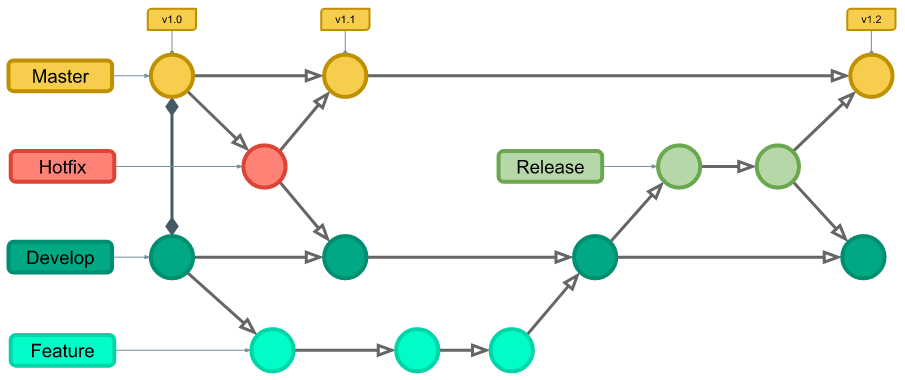
**ตัวอย่างขั้นตอน:**
```bash
# สร้าง Feature Branch จาก develop
git checkout develop
git checkout -b feature/payment-system
# ทำการพัฒนา
echo "// Payment System" > payment.js
git add .
git commit -m "Implement payment system"
# เมื่อเสร็จ push ขึ้นไป
git push origin feature/payment-system
# สร้าง Pull Request feature/payment-system → develop
# เมื่อถึงเวลา Release
git checkout develop
git checkout -b release/1.1.0
# ทำการ Test และแก้ไข Bug
echo "version: 1.1.0" > version.txt
git add .
git commit -m "Bump version to 1.1.0"
# Merge ไป main
git checkout main
git merge --no-ff release/1.1.0
git tag -a v1.1.0 -m "Release version 1.1.0"
# Merge กลับไป develop
git checkout develop
git merge --no-ff release/1.1.0
# ลบ Release Branch
git branch -d release/1.1.0
git push origin main develop --tags
```
### 1.4 GitHub Flow
เป็น Workflow ที่ตรงไปตรงมา เหมาะสำหรับ Continuous Deployment
**ลักษณะเฉพาะ:**
- ใช้ Main Branch เดียว
- สร้าง Feature Branch สำหรับแต่ละ Feature
- Deploy ผ่าน PR ได้
- Simplicity
1. **ง่ายเข้าใจ** - Developer ใหม่เรียนรู้ได้เร็ว
2. **Process สั้น** - Feature → PR → Merge → Deploy (4 ขั้น)
3. **Continuous Deployment** - Deploy ได้บ่อยๆ ได้ทันที
4. **Overhead น้อย** - ไม่ต้องจัดการ release branch, develop branch
5. **Fast Feedback** - ข้อมูลกลับมาเร็ว (จากผู้ใช้)
**ขั้นตอน:**

**ตัวอย่างขั้นตอน:**
```bash
git checkout -b feature/search-function
echo "// Search function" > search.js
git add .
git commit -m "Add search functionality"
git push origin feature/search-function
# สร้าง PR บน GitHub
# เมื่อ PR ได้ Approve ให้ Merge เข้า main
# จากนั้น Deploy ได้เลย (CD Pipeline จะทำให้)
```
### 1.5 Trunk-Based Development (TBD)
เป็น Workflow ที่ Developer ทุกคน **commit ลงไป Main Branch โดยตรง** โดยใช้ **Feature Flags** เพื่อปกป้องฟีเจอร์ที่ยังไม่เสร็จ
**ความเข้าใจง่ายๆ:**
```
┌──────────────────────────────────────┐
│ Git ทำงาน SIMPLE มาก │
│ │
│ Push ลง main เฉยๆ (ไม่ต้อง PR) │
│ ไม่มี feature branches │
└──────────────────────────────────────┘
VS
┌──────────────────────────────────────┐
│ Feature Flags ปกป้องโค้ด │
│ │
│ if (FEATURE_NEW_SEARCH) { │
│ // ใช้ New Search │
│ } else { │
│ // ใช้ Old Search │
│ } │
└──────────────────────────────────────┘
```
**ลักษณะเฉพาะ:**
| ลักษณะ | รายละเอียด |
| ------------ | -------------------------------------- |
| **Branches** | เฉพาะ `main` เดียว (short-lived ถ้ามี) |
| **Commit** | Push ลง main ได้เลย (ไม่ต้อง PR) |
| **ป้องกัน** | Feature Flags wrap โค้ดใหม่ |
| **Deploy** | ได้ทันที (ไม่รอ PR review) |
**ทำไมต้อง Feature Flags?**
```
❌ ปัญหา: Push ลง main → Deploy → ผู้ใช้เห็นทันที
ถ้ามี Bug → โลกทั้งใบทราบ!
✅ วิธีแก้: Feature Flag = ปุ่มเปิด/ปิด
Push ลง main → Deploy → ผู้ใช้ยังไม่เห็น
(ปิด flag ไว้ก่อน)
```
**ตัวอย่าง (ปลอดภัยว่า):**
```javascript
// 1. โค้ดใหม่ห่อด้วย Flag (flag ปิดไว้ก่อน)
const isNewSearchEnabled = process.env.FEATURE_NEW_SEARCH === "true";
export function renderSearch() {
if (isNewSearchEnabled) {
return ; // Feature ใหม่
}
return ; // Feature เดิม (ผู้ใช้ยังอยู่นี่)
}
// 2. Commit ลง main แล้ว Deploy
// Flag ยังปิด → ผู้ใช้เห็น V1 อยู่
// 3. Test ดี → เปิด Flag
FEATURE_NEW_SEARCH = "true"; // ผู้ใช้เห็น V2 แล้ว
// 4. ลบ Flag (เมื่อให้ V2 ถาวร)
export function renderSearch() {
return ; // เหลือแต่ V2 อย่างเดียว
}
```
**ใช้ TBD เมื่อ**
- ✅ **Continuous Deployment**
- Deploy ทุกวันหลายครั้ง (Netflix, Slack, Airbnb)
- ต้องการให้ Feature ไปถึงผู้ใช้เร็วที่สุด
- Pipeline ต้องมีการ Test ที่ชาญฉลาด
- ✅ **Team ทำงานเร็ว**
- Startup ที่ต้องออก Feature มาก ๆ
- ไม่มีเวลา wait Pull Request approve นาน
- Focus ที่ speed to market มากกว่า process
- ✅ **Microservices Architecture**
- Teams ต่างคนต่างได้ Deploy Service ของตัวเอง
- ไม่ต้อง wait PR จากทีมอื่น
- Feature Flags ช่วยให้ Teams ทำงาน Independently
**ไม่ควรใช้ TBD เมื่อ**
- ❌ **Library ที่มี Release cycles** - React, Vue, Express, lodash (ต้องใช้ Git Flow แทน)
- เหตุผล: ต้อง VERSION ชัดเจน (v1.0, v2.0, v3.0)
- ต้องมี Backward compatibility ที่ชัดเจน
- Deprecation warnings ต้องมีเวลาแจ้งให้ผู้ใช้ทราบ
- ไม่สามารถ Deploy ทุกวันได้ (ต้องส่วน Release lifecycle ที่อย่างเป็นทางการ)
---
## สรุปเปรียบเทียบ Git Workflows ทั้งหมด
| ลักษณะ | Centralized | Feature Branch | Git Flow | GitHub Flow | Trunk-Based |
| -------------------- | -------------- | --------------- | ----------------------------- | -------------- | -------------------------------- |
| **Branches** | 1 (main) | main + feature | 5 Types | main + feature | 1 (main) |
| **Complexity** | Very Simple | Simple | Complex | Simple | Simple |
| **PR Review** | ไม่มี | ต้องมี | ต้องมี | ต้องมี | ไม่มี |
| **Release Cycle** | Ad-hoc | Per feature | Scheduled | Continuous | Continuous |
| **Deploy Frequency** | Low | Medium | Scheduled | High | Very High |
| **Team Size** | Very Small | Small-Medium | Large | Small-Medium | Medium-Large |
| **Use Case** | Local projects | Solo dev + team | libraries, versioned products | Web apps, SaaS | Microservices, Fast-moving teams |
| **Learning Curve** | \* | \*\* | \*\*\*\* | \*\* | \*\*\* |
| **Risk** | High | Medium | Low | Low | Medium (ต้องมี tests) |
---
## 2. Pull Request (PR) และ Code Review
### 2.1 ประเภทของ Pull Request
#### A. Feature PR
```
Title: Add user authentication system
Description:
- Add login functionality
- Add JWT token validation
- Add password hashing
Related Issue: #123
```
#### B. Bugfix PR
```
Title: Fix memory leak in cache service
Description:
- Problem: Memory usage keeps increasing
- Root cause: Cache not clearing old entries
- Solution: Implement LRU cache eviction
Fixes: #456
```
#### C. Refactoring PR
```
Title: Refactor UserService to use dependency injection
Description:
- Improve code maintainability
- Reduce coupling between components
- Add unit tests for refactored code
```
### 2.2 Code Review Checklist
**ให้ Reviewer ตรวจสอบ:**
```markdown
## Code Review Checklist
- [ ] **Functionality**: โค้ดทำงานตามที่คาดหวัง?
- [ ] **Code Quality**: โค้ดเรียบร้อย ปฏิบัติตาม Style Guide?
- [ ] **Testing**: มี Unit Tests หรือ Integration Tests?
- [ ] **Performance**: มีปัญหาด้าน Performance?
- [ ] **Security**: มี Security Issues?
- [ ] **Documentation**: มี Documentation ครบถ้วน?
- [ ] **Dependencies**: มีการเพิ่ม Dependencies ใหม่ที่ไม่จำเป็น?
- [ ] **Breaking Changes**: มี Breaking Changes ที่ไม่ได้ระบุ?
```
### 2.3 ตัวอย่าง PR Template
````markdown
## Description
โปรดอธิบายการเปลี่ยนแปลงของคุณ
## Type of change
- [ ] New feature
- [ ] Bug fix
- [ ] Breaking change
- [ ] Documentation update
## Related Issue
Fixes #(issue number)
## Testing
อธิบายวิธีที่ใช้ test เช่น:
```bash
npm test
npm run test:e2e
```
````
## Screenshots (if applicable)
เพิ่มภาพถ้าเป็น UI changes
## Checklist
- [ ] โค้ดของฉันปฏิบัติตาม Style Guide
- [ ] ฉัน review โค้ดของตัวเองแล้ว
- [ ] ฉันได้เพิ่ม Tests
- [ ] Tests ผ่านทั้งหมด
- [ ] ฉันได้ update Documentation
### 2.4 Code Review Best Practices
**สำหรับผู้ส่ง PR:**
```
1. PR ให้เล็กๆ (Small PR)
- ขนาด 200-400 lines ของเปลี่ยนแปลง
- ห้มใจเข้าเดียวยน feature เดียว
2. PR Description ให้ชัดเจน
- อธิบาย What และ Why
- อ้างอิง Issues ที่เกี่ยวข้อง
3. Update PR เมื่อมี Review Comments
- Commit แก้ไขเป็นการ push เพิ่มเติม
- อย่า Force Push เพื่อให้ดูการแก้ไข
4. ให้ Reviewer ทำการ Test
- Provide Test Instructions
- Provide Test Data หากจำเป็น
```
**สำหรับ Code Reviewer:**
```
1. Review ให้เร็ว
- ทำเมื่อได้รับ PR ภายใน 24 ชั่วโมง
- มิฉะนั้น Blocking Progress
2. Review ให้สร้างสรรค์
- ไม่ว่าด้วยว่าตัวเลือก (ไม่ใช่ที่จะต้องเปลี่ยน)
- Suggestion แทน Demand
3. Comment ให้เจาะจง
- อ้างอิง Line Numbers
- Suggest แก้ไขด้วย Code
4. Approve หรือ Request Changes อย่างชัดเจน
- Approve: PR พร้อม Merge
- Request Changes: PR ต้อง Revise
```
---
## 3. Branch Strategy
### 3.1 Naming Convention
```
feature/ - สำหรับ Feature ใหม่
feature/user-authentication
feature/payment-integration
bugfix/ - สำหรับการแก้ไข Bug
bugfix/fix-memory-leak
bugfix/handle-edge-case
hotfix/ - สำหรับการแก้ไข Emergency บน Production
hotfix/critical-security-issue
hotfix/payment-processing-down
release/ - สำหรับการเตรียม Release
release/1.2.0
release/2.0.0
refactor/ - สำหรับการปรับปรุง Code
refactor/extract-user-service
refactor/improve-performance
docs/ - สำหรับการอัปเดท Documentation
docs/update-api-documentation
docs/add-deployment-guide
test/ - สำหรับการเพิ่ม Tests
test/add-unit-tests
test/improve-e2e-tests
```
### 3.2 Branch Protection Rules
```yaml
# ตั้งค่าบน GitHub Repository settings
branch_protection:
main:
require_pull_request_reviews: true
required_approving_review_count: 2
require_code_owner_reviews: true
require_status_checks_to_pass: true
- ci/github-actions
- code-quality/sonarqube
require_branches_to_be_up_to_date: true
allow_deletion: false
allow_force_pushes: false
develop:
require_pull_request_reviews: true
required_approving_review_count: 1
require_status_checks_to_pass: true
- ci/github-actions
allow_deletion: true
```
---
## 4. Merge Strategies
### 4.1 Three-Way Merge (Default)
```
สร้าง Merge Commit ใหม่ที่รวม Branch สองสาย
feature ──────────C3──────────
/
/
main ──C1──C2──C4(Merge)──
```
**Command:**
```bash
git checkout main
git merge feature
# หรือบน GitHub PR: "Create a merge commit"
```
### 4.2 Squash and Merge
รวม Commits ทั้งหมดของ Feature Branch เป็น Commit เดียว
```
Before:
feature ──C3──C4──C5──
/
main ──C1──C2──/
After:
main ──C1──C2──C6(squashed)──
(C6 มี content ของ C3+C4+C5)
```
**Command:**
```bash
git checkout main
git merge --squash feature
git commit -m "Merge feature/payment"
# หรือบน GitHub PR: "Squash and merge"
```
**เมื่อใช้:**
- Feature branch มี commits นั้นตัน
- ต้องการให้ Main Branch History เรียบร้อย
### 4.3 เปรียบเทียบ Merge Strategies
| Strategy | History | ใช้เมื่อไร |
| --------------- | ------- | ---------------------------------- |
| Three-Way Merge | ทั่วไป | ปลอดภัย เห็น branch history |
| Squash & Merge | สะอาด | Commits เยอะ ต้องให้ Main สระบร้อย |
---
## 5. ตัวอย่าง Workflow พื้นฐาน
### 5.1 Hotfix Workflow
```bash
# 1. สร้าง Hotfix Branch จาก main
git checkout main
git pull origin main
git checkout -b hotfix/critical-security
# 2. แก้ไข Bug
echo "
// Fixed security vulnerability
const sanitizeInput = (input) => {
return input.replace(/